


In modern database infrastructure, high availability (HA) is critical for keeping systems operational through node failures, maintenance windows, and other disruptions. PostgreSQL, while powerful, doesn't include built-in tooling for achieving HA on its own. This is where Patroni comes in as a PostgreSQL HA solution that manages replication and failover combined with etcd as a distributed key-value store and HAProxy as a load balancer, you can build a genuinely resilient, highly available PostgreSQL cluster.
This guide walks through setting up a highly available PostgreSQL cluster using three etcd nodes for distributed consensus, two Patroni nodes for PostgreSQL replication and failover, HAProxy nodes for load balancing, and Keepalived for virtual IP (VIP) failover.
High availability isn't one tool, it's several tools, each handling one layer of failure, working together.
What Role Does Each Component Play?
Patroni: Replication and Failover
Patroni is an open-source tool designed to manage PostgreSQL HA clusters. It provides an automated, reliable solution for database failover and replication, coordinating leader election, monitoring cluster health, and promoting standby nodes to primary when necessary. Its ease of configuration and integration with existing infrastructure makes it a popular choice for managing HA PostgreSQL environments.
ETCD: Distributed Consensus
ETCD is a distributed key-value store that plays a crucial role in achieving HA for PostgreSQL clusters, storing configuration data and coordinating cluster nodes for tools like Patroni. By providing a consensus-based mechanism, etcd ensures that only one PostgreSQL node acts as primary (leader) at any given time, while others function as replicas. If the primary node fails, etcd facilitates the automatic promotion of a replica to primary, minimizing downtime.
HAProxy: Load Balancing and Traffic Routing
HAProxy is a high-performance, open-source load balancer and proxy server that manages traffic between the application and the database cluster automatically directing write operations to the primary node and read operations to replica nodes. If the primary PostgreSQL instance fails, HAProxy, in combination with Patroni, seamlessly reroutes traffic to the newly promoted primary, ensuring minimal downtime.
Keepalived: Virtual IP Failover
Keepalived is open-source routing software that enhances service availability by implementing HA features for systems like HAProxy. It enables multiple HAProxy instances to share a virtual IP address (VIP), ensuring clients can always reach the load balancer even if one instance fails. Keepalived monitors HAProxy node health, and if the primary instance becomes unresponsive, automatically transfers the VIP to a standby instance allowing continuous access to backend services without manual intervention.
Each tool covers a different failure mode: etcd handles split-brain prevention, Patroni handles database-level failover, HAProxy handles traffic routing, and Keepalived handles load-balancer-level failover itself.
What Does the Architecture Look Like?
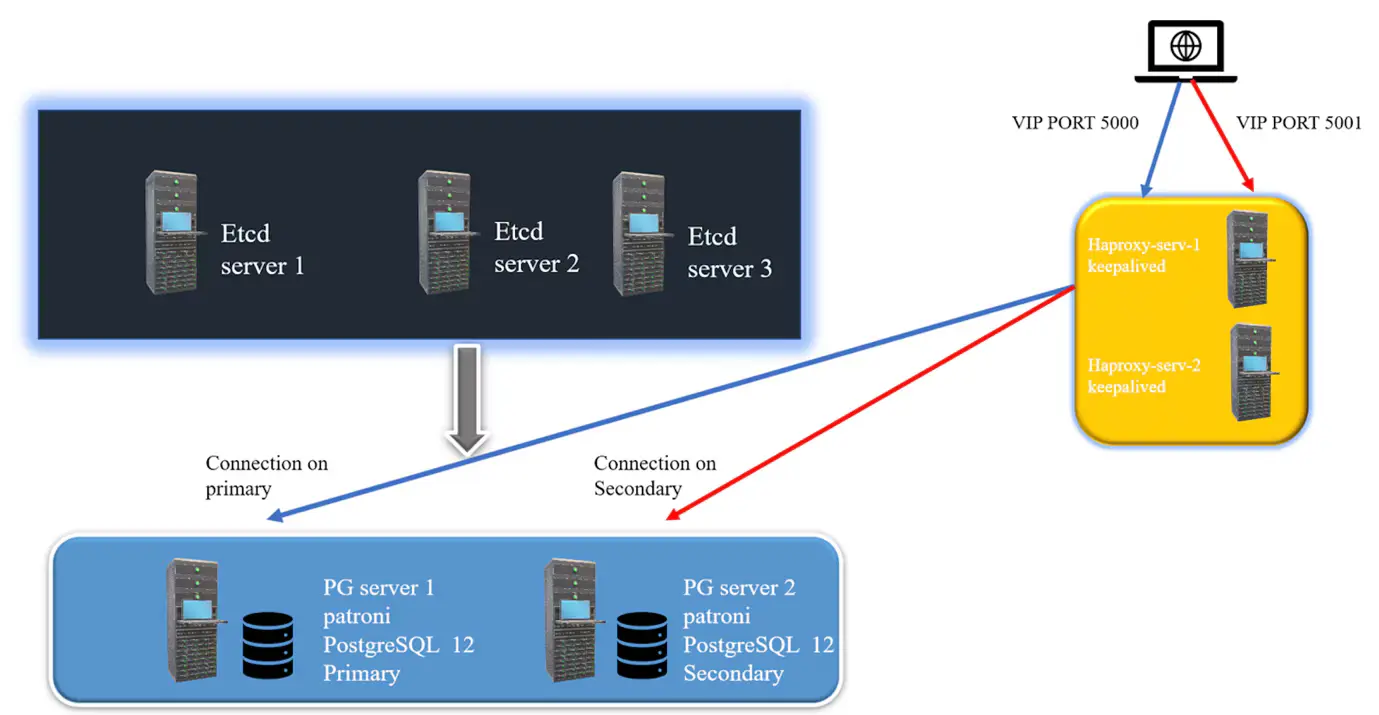
The complete architecture includes three etcd nodes for distributed configuration management and failover handling; Patroni nodes running PostgreSQL, with Patroni ensuring one node acts as leader while the other is a follower (replica); HAProxy nodes that forward database traffic to the active Patroni leader, providing load balancing and failover; and Keepalived running on the HAProxy nodes to manage the VIP, if one HAProxy node fails, Keepalived automatically shifts the VIP to the surviving node.
How Do You Set Up the HA Cluster Step by Step?
Step 1: Set Up a 3-Node ETCD Cluster
The etcd cluster stores the state of the Patroni cluster and helps with leader election. After installing etcd on all three nodes, each node's configuration file (typically /etc/default/etcd or /etc/etcd/etcd.conf, depending on OS) needs values for the node name, data directory, listen and advertise URLs for both peer and client communication, and the full initial cluster member list. The same configuration is repeated on all three nodes, changing only the node name and IP address, before starting and enabling the etcd service.
Install ETCD on all 3 ETCD nodes:

Start and enable ETCD:

Step 2: Installing and Configure Patroni
With Patroni installed on both PostgreSQL nodes, each node needs a configuration file (typically /etc/patroni.yml) defining the cluster scope and namespace, a REST API listener for health checks, the etcd cluster address, bootstrap parameters such as TTL and retry timeout, PostgreSQL-specific parameters (WAL level, replication slots, synchronous commit behavior), authentication credentials for replication and superuser access, and the PostgreSQL data and binary directory paths. The second node's configuration mirrors the first, with its own node name and connection address. Patroni is then started on both nodes.
Install patroni on both servers:

Step 3 Setup HA Proxy
After installing HAProxy on both nodes, the configuration file (/etc/haproxy/haproxy.cfg) defines global and default settings logging, connection limits, timeouts, and retry behavior followed by a frontend listening on the PostgreSQL port and a backend that load-balances across both Patroni nodes, using a TCP health check against Patroni's REST API port to determine which node is currently the leader.
Install HA Proxy:

Start HA PROXY:

Step 4: Setup Keepalived
With Keepalived installed on both HAProxy nodes, each node's configuration file (/etc/keepalived/keepalived.conf) defines a virtual IP for failover. A health-check script monitors whether HAProxy is running, and a VRRP instance configuration designates one node as MASTER and the other as BACKUP, sharing a virtual IP address and authentication credentials. If the MASTER node's HAProxy process stops responding, the VIP automatically shifts to the BACKUP node.
Install Keepalived:

Every step here follows the same pattern: install, configure with node-specific identity, then verify the failover actually behaves as expected before considering it production-ready.
How Do You Verify the Cluster Is Working?
Running patronictl list against the cluster shows each member's role, state, timeline, and replication lag. In a healthy two-node setup, one member shows as Leader in a running state, and the other shows as Replica, also running, with a lag close to zero confirming that the PostgreSQL cluster is running with one leader and one replica correctly replicating from it.
Key Takeaways
- A production-grade PostgreSQL HA setup requires four distinct tools, each solving a different layer of the failover problem
- etcd's consensus mechanism is what prevents two PostgreSQL nodes from both acting as primary at once
- HAProxy's health checks against Patroni's REST API are what let it always route writes to the current leader, even after a failover
- Keepalived's VIP failover protects against the load balancer itself becoming a single point of failure
- patronictl list is the fastest way to verify cluster health and confirm replication lag is under control
Conclusion
Setting up a highly available PostgreSQL cluster with etcd, Patroni, HAProxy, and Keepalived ensures your database stays online even through multiple node failures. This HA setup distributes responsibility across layers: etcd ensures distributed consensus for Patroni, Patroni manages PostgreSQL replication and failover, HAProxy distributes traffic between database nodes, and Keepalived handles failover at the load-balancing layer with a floating VIP. Following this pattern gives you a robust, resilient PostgreSQL environment capable of handling node failures with minimal downtime.
This kind of infrastructure discipline pairs naturally with the approach in our cloud database cost optimization case study, where a similar open-source PostgreSQL deployment delivered 60-70% cost savings over a managed service proving that open-source, self-managed HA doesn't have to mean sacrificing either reliability or cost efficiency.
Looking to build resilient, cost-effective database infrastructure? Connect with our experts to explore the right architecture for your organization.







Email: info@bajajtechai.com
Ph. No.: +91 9049001579 (Mon to Sat - 9 am to 6 pm IST)
