


According to McKinsey, AI-powered personalization typically lifts e-commerce revenue by 10–15%, with top performers seeing gains of up to 25%. Yet most enterprises still show every visitor the same product grid, the same homepage, the same “recommended for you” rail regardless of who’s actually browsing. The gap between “we have customer data” and “we use customer data to drive revenue” is where most personalization initiatives stall.
This blog breaks down how Bajaj Tech.AI designed and implemented an AI-driven product recommendation system on Adobe Sensei for an e-commerce client, the architecture decisions behind it, why Sensei was chosen over the alternatives, and the business outcomes it delivered.
Why Do Most E-commerce Personalization Efforts Fall Short?
Personalization usually fails for a structural reason, not a technology reason: customer behavior data lives in one system (the storefront), while product and pricing data lives in another (the commerce backend), and the two rarely talk to each other in real time. The result is a recommendation experience that’s either generic (“customers also bought”) or stale (updated in nightly batches, not as the customer browses).
For a large e-commerce platform, this shows up directly in the numbers. Shoppers who click on AI-driven recommendations are roughly 4.5 times more likely to purchase than those who don’t, according to McKinsey but only when the recommendation is genuinely relevant to what that shopper is doing right now. Getting there requires real-time behavioral signals, not static rules.
This isn’t just a technical inconvenience it’s a revenue problem. Cart abandonment across e-commerce averages over 70% globally, and a meaningful share of that is customers who simply didn’t see anything relevant enough to act on. Fixing it isn’t about adding another AI feature to the storefront; it’s about closing the loop between what a customer does and what the platform shows them, in real time.
Summary: Personalization fails when behavioral and product data are disconnected; real business impact requires real-time signals, not batch-updated rules.
What Is Adobe Sensei, and How Does It Power Recommendations?

Adobe Sensei is the AI and machine learning layer built into Adobe’s Experience and Commerce Cloud products. In simple terms, it’s the engine that watches how customers interact with a storefront what they view, search for, add to cart, or wishlist and uses that behavior, combined with product data, to decide what to show each visitor next.
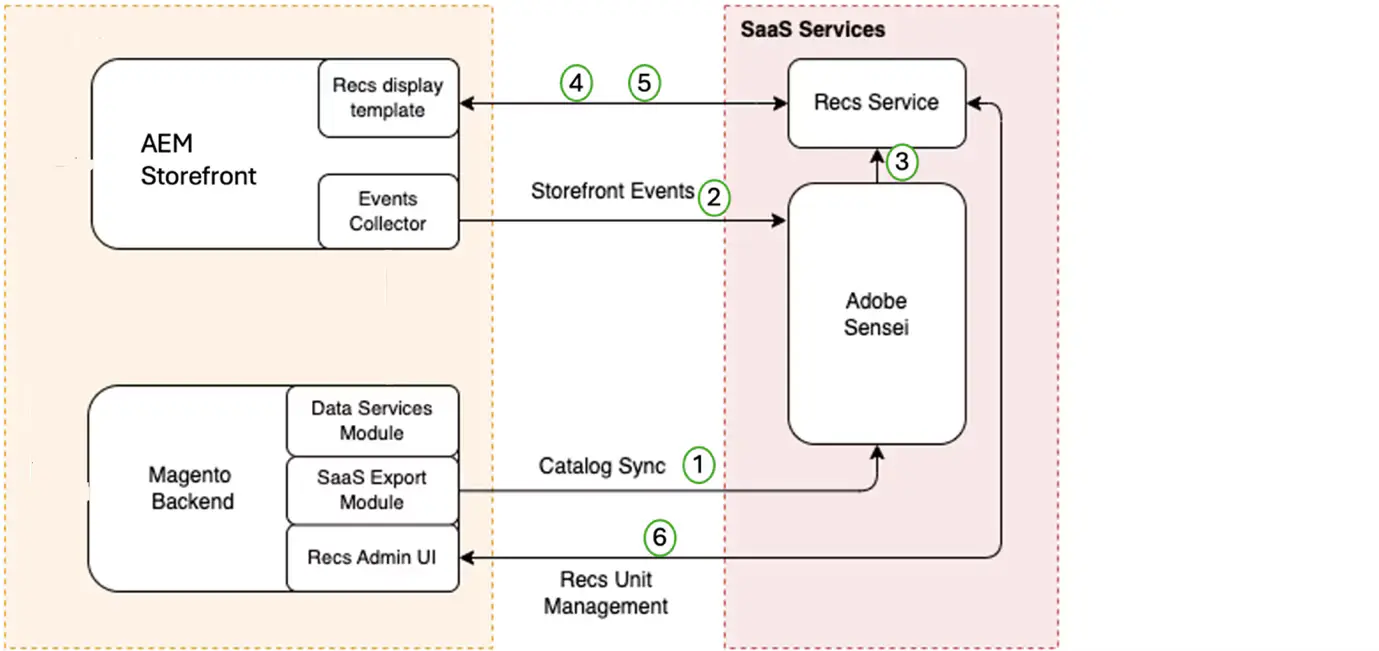
For our implementation, the storefront was rendered through Adobe Experience Manager (AEM) in a headless setup, connected to Adobe Commerce (built on Magento) via GraphQL. Every meaningful customer action on the storefront was captured as an “event” (view, add-to-cart, add-to-wishlist, and so on) and passed to Sensei through Adobe’s Events SDK. Sensei processes these events and returns product recommendations that update as the customer’s behavior does.
Summary: Adobe Sensei uses real-time customer behavior events, captured from the storefront, to power live product recommendations rather than static, rule-based ones.
How Product Recommendation Works:
Why Did We Choose Adobe Sensei Over Building or Buying Elsewhere?
Three paths were on the table:
- Building natively on AEM: AEM offers some customization options, but building a fully tailored recommendation engine from scratch was too resource-intensive and complex to justify, given how much groundwork a rules and ranking engine requires.
- Third-party recommendation engines: Several external vendors were evaluated. All of them would have required additional integration work and wouldn’t have fully used the data and insights already sitting inside the existing Adobe ecosystem.
- Adobe Sensei: Because Sensei is built to work natively with AEM and Adobe Commerce, it offered a scalable option that plugged directly into the existing environment, used data that was already there, and delivered real-time, data-driven recommendations without a parallel data pipeline.
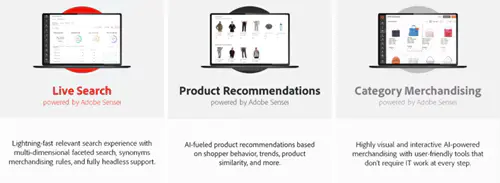
Sensei was selected for three reasons: it integrated seamlessly with the existing AEM and Commerce stack (avoiding the inconsistencies that come with third-party tools), it applies real machine learning to customer behavior and product data rather than static rules, and as a SaaS solution it scales with growing data and traffic without re-architecture.
Summary: Sensei won out because it worked natively with the existing Adobe stack, applied real machine learning instead of static rules, and scaled without extra infrastructure.
Steps for Product Recommendation Commerce Admin Setup (Magento)
- Product recommendations module installation and configuration
- API keys setups for using Adobe Sensei
- Composer configuration
- Commerce Frontend display for recommendations
- Confirmation on Events from Commerce Frontend sent to Adobe Sensei through recommendation service
- Explored options (JavaScript) to send events to Adobe Sensei
- Installation of 4 additional below modules for working of Recommendations
- magento/product-recommendations
- magento/module-page-builder-product-recommendations
- magento/module-visual-product-recommendations
- magento/module-data-services-graphql
Steps for Product Recommendation Component Setup (AEM)
- Installation of Venia project on local AEM instance
- Configure product Recommendation component in the project
- Added Event collector SDK for event collection
- Added chrome extension Snowplow Inspector (by Poplin Data) to track events
- For custom events, configured events in events collector SDK
Steps to Implement Product Recommendation Component
- Extend OOTB Product Recommendation Component :
Extend the OOTB product recommendation component with their sling:resourceSuperType into your project. - Install Commerce Addon Package :
Install the commerce addon package into crx-de. - Create Configuration:
Add this Adobe Sensei endpoint into the configuration:
https://integration2-hohc4oi-dbbagraajxpgk.us-a1.magentosite.cloud/graphql - Install Venia Client Libraries Package :
Install the Venia client libraries package. Then, add these client libraries to the path
web/components/structure/page/customfooterlibs.html:
<sly data-sly-use.clientlib="/libs/granite/sightly/templates/clientlib.html">
<sly data-sly-call="${clientlib.all @ categories='name of categories'}" />
</sly
<sly data-sly-use.clientlib="/libs/granite/sightly/templates/clientlib.html">
<sly data-sly-call="${clientlib.all @ categories='name of categories'}" />
</sly> - Add Client Libraries to Page Head :
Add these client libraries to the path web/components/structure/page/head.html:
<meta name="store-config" content="{"storeView":"default","graphqlEndpoint":"/api/graphql","graphqlMethod":"GET","headers":{"Store":"default"},"locale":"en-us","storeRootUrl":"/content/project-name/us/en.html","enableClientSidePriceLoading":false}">
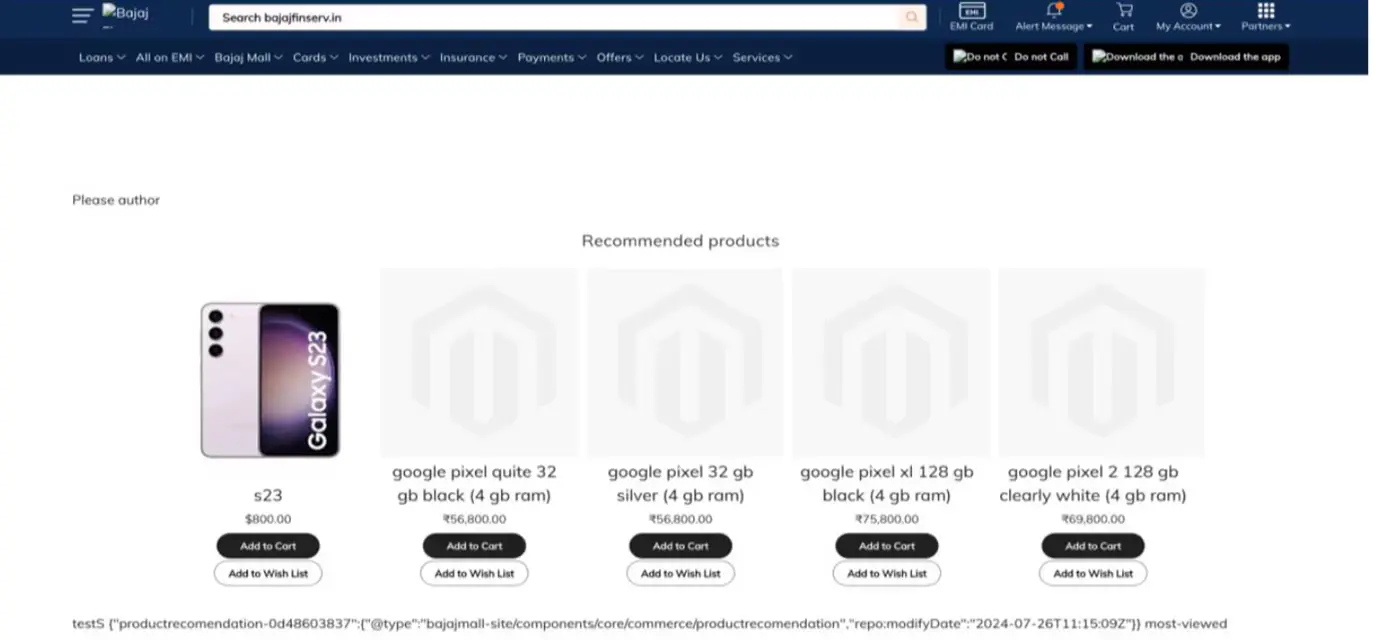
Verify Product Recommendation : You should now be able to see product recommendations on your page.
How Was the Solution Architected and Implemented?
The implementation was built in four stages:
- Setup and configuration: Installing the recommendation modules in Adobe Commerce, generating API keys for Sensei, and configuring the AEM-Commerce connector so data could flow between the two systems.
- Event collection: Deploying Adobe’s Event Collector SDK across the AEM storefront to track customer interactions the raw behavioral signal Sensei needs to generate accurate recommendations.
- Recommendation component setup: Integrating Sensei’s product recommendation component into AEM and customizing it to fit the platform’s specific templates and use cases.
- Custom event integration: Going beyond Adobe’s default events (view, add-to-cart, add-to-wishlist) to define business-specific signals. For example, a custom “color” attribute was created in Adobe Commerce and passed to Sensei, allowing the recommendation algorithm to factor in colour similarity not just category or price when surfacing similar products.
This last point matters strategically: out-of-the-box recommendation engines optimize for generic similarity. Custom events let the business decide which product attributes actually drive purchase decisions for its category, and tune the AI accordingly.
Validation mattered as much as configuration. Before rolling the component out platform-wide, the team verified that events were actually reaching Sensei correctly checking both default events (view, add-to-cart, add-to-wishlist) and the custom colour-based event before confirming recommendations were rendering as expected on live product pages. Skipping this step is one of the most common reasons personalization projects under-deliver: the recommendation component looks correct in a demo but is quietly working off incomplete or incorrectly mapped data in production.
Summary: The build combined standard Adobe configuration with custom-defined behavioral events, letting the recommendation engine reflect business-specific buying signals, not just generic product similarity.specific user interactions, allowing us to capture more granular data for analysis.
What Business Results Did the Implementation Deliver?
Once live, the recommendation engine delivered results across three dimensions:
- Enhanced personalization: Recommendations became directly tied to individual browsing behavior including specific attributes like colour preference meaningfully improving relevance and engagement.
- Increased conversion rates: By surfacing products customers were more likely to actually want, the platform saw a measurable lift in conversions, consistent with the broader trend of AI-recommended products converting significantly better than generic listings.
- Scalability without rework: Because Sensei is SaaS-based, the recommendation engine scaled with growing data volumes and traffic without requiring re-architecture or re-platforming.
None of these outcomes required the team to move off the existing Adobe investment or introduce a new data platform the gains came from using the data and infrastructure that were already in place, wired together correctly.
At Bajaj Tech.AI, we help enterprises implement AI-driven personalization on their existing Adobe stack combining deep Experience & Commerce implementation expertise with the ability to define custom, business-specific event tracking, so the recommendation engine reflects what actually drives conversions in a given category.
Summary: The implementation improved personalization relevance, lifted conversion rates, and scaled with traffic growth without additional infrastructure investment.
Key Takeaways
- Personalization only pays off when it runs on real-time behavioral data not static, batch-updated rules.
- Adobe Sensei allows enterprises to add AI-driven recommendations on top of an existing AEM and Commerce stack, without a costly rebuild.
- Custom event tracking (such as attribute-based signals) lets a recommendation engine reflect what actually drives purchases in a specific category, not just generic “customers also bought” logic.
- Choosing a natively-integrated AI layer over a third-party bolt-on reduces integration complexity and long-term maintenance overhead.
- A well-implemented recommendation engine improves both conversion rates and customer engagement, while a SaaS-based architecture ensures it scales as data volume grows.
Conclusion
Product recommendations are one of the clearest examples of AI delivering measurable e-commerce ROI but only when they’re built on real-time behavioral data and tuned to the signals that actually matter for a given business. For enterprises already invested in the Adobe ecosystem, Sensei offers a way to get there without a parallel build or a third-party dependency. As agentic and AI-driven commerce continues to reshape how customers discover products, the businesses that treat personalization as a data and architecture problem not just a feature toggle will be the ones that capture the upside.
Looking to bring AI-driven personalization to your e-commerce platform? Connect with our experts to build your roadmap.







Email: info@bajajtechai.com
Ph. No.: +91 9049001579 (Mon to Sat - 9 am to 6 pm IST)
