


Summary
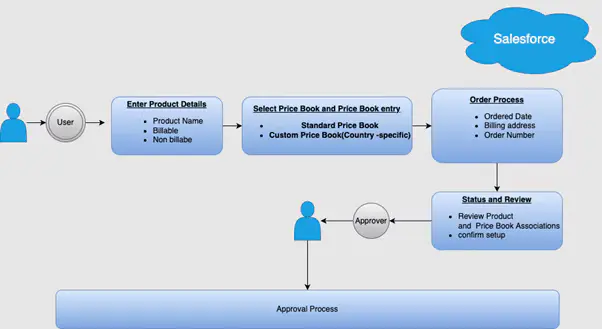
In the standard Salesforce process, creating a product and adding it to the Standard Price Book or other custom price books involves several steps spanning 4-5 screens a process that becomes increasingly inefficient as the number of products and price books grows, especially when dealing with country-specific price books or billable versus non-billable products. For a business managing a large and growing product catalog, this kind of friction adds up quickly across every team member doing setup work regularly.
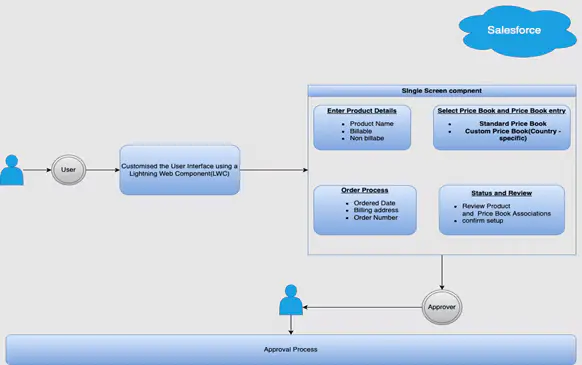
Bajaj Tech.AI designed a custom Lightning Web Component (LWC) that consolidates the entire workflow into a single screen, letting users create products, assign them to multiple price books, and categorize them, all from one unified interface.
Business Challenge
The standard Salesforce product and pricebook setup process required navigating 4-5 separate screens to complete a single product creation task. This multi-step process slowed down user productivity, particularly when dealing with country-specific price books or differentiating between billable and non-billable products. As the number of products and price books increased, this inefficiency became increasingly apparent what started as a minor friction point compounded into meaningful lost time as the business scaled its product catalog, with the same multi-screen journey repeated for every new product added.
The challenge wasn't that the standard Salesforce workflow was broken it was that it wasn't designed for an organization managing this many products and price book variations at once.
Solution Approach
To address the challenge, Bajaj Tech.AI designed a bespoke Lightning Web Component that consolidates the entire workflow into a single screen, allowing users to create new products quickly and efficiently, assign products to various price books (including the Standard Price Book and country-specific price books), and distinguish between billable and non-billable products for different scenarios.
Key Features
- Single-screen interface: Users can create a product and add it to price books from a unified interface, eliminating the need to navigate through multiple screens.
- Product categorization: The interface includes options for differentiating products as billable or non-billable, making it easier to manage various product types.
- Price book association: Products can be assigned to multiple price books, including regional or country-specific price books, from the same screen.
- Fewer clicks, faster setup: The overall process was reduced to a single step, cutting down both the number of clicks and the time required to set up a product.
Implementation Approach
- Requirements gathering: Close collaboration with business users to understand their pain points in the existing multi-screen process.
- LWC design and development: The custom LWC was built to combine product creation and price book assignment into one seamless interface.
- Testing and feedback: The solution was tested with end-users to ensure it met their expectations, and refined based on their feedback before rollout.
- Deployment and training: The final solution was deployed, and users were trained on the new interface to further support adoption.
Starting with requirements gathering directly from the business users who'd use the tool daily is what ensured the final single-screen design actually matched how they worked, rather than just being technically simpler.
End to End Process Flow:
Seamless Journey for User After Implementation:
Business Impact & Results
- Enhanced efficiency: By reducing the number of screens and clicks, users save valuable time during the product creation process.
- Improved user experience: The simplified interface allows users to complete tasks faster, without losing focus or context switching between screens.
- Scalability: The solution is flexible enough to handle more products and price books as the business grows, without reintroducing the original bottleneck.
- Consistency: Standardizing the setup process reduces errors and ensures consistent data entry across the platform.
The custom LWC transformed product and price book setup from a complex, multi-step task into a user-friendly, efficient workflow letting users focus on growing the business rather than navigating administrative screens.
Key Takeaways
- A multi-screen setup process that seems manageable at low volume can become a real productivity drag as product and price book counts grow
- A custom Lightning Web Component can consolidate several standard Salesforce screens into one purpose-built interface
- Involving end users early in requirements gathering is what ensures a simplified interface actually matches real workflows
- Standardizing data entry through a single interface reduces errors as a natural side effect of reducing steps
- This kind of CRM customization reflects the same efficiency-first approach behind Bajaj Tech.AI's other Salesforce engagements
Conclusion
The custom LWC solution transforms the way products and price books are managed in Salesforce, making the process faster, easier, and more efficient. By eliminating unnecessary steps, the solution let users focus on what matters most growing the business, not getting bogged down by administrative tasks. This approach not only enhances user productivity but also ensures that product setup is done accurately and consistently. It shows how targeted, well-scoped Salesforce customizations can meaningfully improve both user experience and operational efficiency, without requiring a broader platform overhaul.
This kind of purpose-built CRM customization complements the centralized platform approach behind our dealer renewal management case study both engagements share the same underlying principle of reducing steps to reduce friction.
Looking to solve a similar business challenge? Connect with our experts to explore the right Salesforce solution for your organization.






Email: info@bajajtechai.com
Ph. No.: +91 9049001579 (Mon to Sat - 9 am to 6 pm IST)
