


Generating PDFs invoices, reports, contracts directly from Salesforce sounds simple until you actually try it. Between Content Security Policy restrictions, governor limits, and formatting inconsistencies between browser rendering and PDF output, Salesforce's native PDF generation has real, well-documented friction points. Lightning Web Components (LWC) offer a more modern, flexible path through these constraints than older approaches like Visualforce. Here's a technical look at the common challenges and how LWC addresses them.
PDF generation in Salesforce isn't hard because the concept is complex, it's hard because so many small platform constraints stack up at once.
What Makes PDF Generation in Salesforce Genuinely Difficult?
- Content Security Policy (CSP) restrictions: Salesforce enforces strict CSP rules that can block certain content, such as displaying data: URLs in iframes. This often restricts how PDFs render within an LWC and requires workarounds or careful configuration.
- Governor limits: Salesforce imposes strict limits on CPU time, heap size, and execution time, which can affect complex PDF generation, especially when large amounts of data need to be retrieved or processed.
- Formatting complexities: Creating custom layouts and styling for PDFs is challenging, since HTML and CSS may not render the same way in a PDF as in a browser, leading to design inconsistencies.
- Image embedding: Including images typically requires Base64 encoding, which increases file size and can impact performance or exceed Salesforce limits.
- Limited libraries: Salesforce doesn't natively support advanced PDF libraries. External libraries like jsPDF are available, but may have limitations in complex scenarios, and their use can be restricted by CSP.
- Data privacy: Handling sensitive data during PDF generation requires extra caution, particularly when PDFs are generated client-side with libraries like jsPDF.
- Browser compatibility: Different browsers handle iframe content, Base64 encoding, and JavaScript PDF generation libraries differently, which can create inconsistent user experiences.
- Error handling and debugging: Debugging can be complex, since errors might only appear in specific contexts, certain data, certain browsers and Salesforce's development tools have their own limitations for troubleshooting.
- Performance issues: Generating large PDFs with extensive content or high-resolution images can create performance bottlenecks, both client- and server-side.
Each of these challenges has a workaround, but they consistently require balancing functionality, security, and performance against each other rarely does a solution improve all three at once.
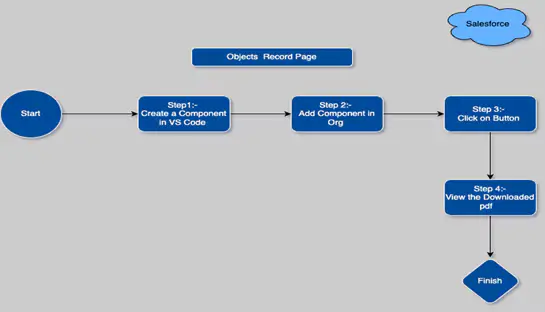
Flow of pdf Generation Process :-
Why Choose LWC Over Visualforce or External Tools?
- Modern user experience: LWC offers a more streamlined, interactive experience compared to older technologies like Visualforce.
- Efficiency: Using LWC for PDF generation is quicker and more scalable, particularly with the ability to call server-side logic via Apex.
- Customizability: With JavaScript and HTML at your disposal, you can build highly customized PDFs that align with specific business needs.
- No third-party dependencies: You can avoid the cost and complexity of integrating external libraries or services entirely, depending on the use case.
What Tools Do You Need to Build This?
- LWC component: Handles user interaction and renders the PDF on the frontend.
- Apex controller: Interacts with the Salesforce backend to fetch data and serve it to the LWC.
- JavaScript library (optional): Libraries like jsPDF can make PDF generation more flexible and efficient for client-side rendering scenarios.
What Are the Real Benefits of Using LWC for PDF Generation?
- Modern and responsive UI: LWC enables a clean, responsive interface built with standard web components, matching Salesforce's Lightning look and feel with intuitive interactions.
- Enhanced performance: Built on modern JavaScript, LWC is optimized for faster rendering than older frameworks like Aura particularly valuable for data-heavy PDF generation.
- Component-based structure: LWC's modular approach lets you build the PDF generation feature as a reusable component that's easy to maintain, update, or reuse elsewhere in the application.
- Seamless integration with Apex: LWCs integrate directly with Apex, letting developers retrieve and process data server-side before passing it to the LWC for rendering ideal when sensitive or large volumes of data are involved.
- Flexible rendering options: Developers can render PDFs inline using iframes or offer them as downloadable files, tailoring the experience to how the PDF is actually going to be used.
The seamless Apex integration is arguably the most important benefit for enterprise use cases, it lets the heavy data processing happen server-side, where governor limits are easier to manage, while the LWC handles a lighter rendering task.
Key Takeaways
- PDF generation in Salesforce is constrained by CSP, governor limits, and formatting inconsistencies that require deliberate workarounds
- LWC's modern JavaScript foundation gives it a real performance edge over older frameworks like Visualforce or Aura for this use case
- Handling data processing in Apex rather than client-side keeps sensitive or large datasets within Salesforce's more manageable server-side limits
- Flexible rendering inline or downloadable lets the same component serve multiple document use cases like invoices, reports, and contracts
- This kind of targeted Salesforce customization reflects the same CRM engineering discipline behind Bajaj Tech.AI's other Lightning Web Component work
Conclusion
Generating PDFs using LWC in Salesforce provides flexibility and efficiency, allowing you to create tailored documents for various business needs. Whether you generate PDFs server-side with Apex or client-side using jsPDF, the key is choosing the right method for your specific use case. This approach is well suited for creating dynamic, data-driven documents such as invoices, reports, or contracts delivering a modern, seamless experience that meets both business and technical requirements.
This kind of Lightning Web Component work pairs naturally with the product and pricebook setup customization Bajaj Tech.AI built elsewhere in Salesforce both reflect the same principle of using LWC to consolidate a multi-step, friction-heavy task into a single, purpose-built interface.
Looking to build custom document generation into your Salesforce environment? Connect with our experts to explore the right approach for your business.






Email: info@bajajtechai.com
Ph. No.: +91 9049001579 (Mon to Sat - 9 am to 6 pm IST)
